Fabric Apps: Shifting from Analytics to Translytical Web Applications
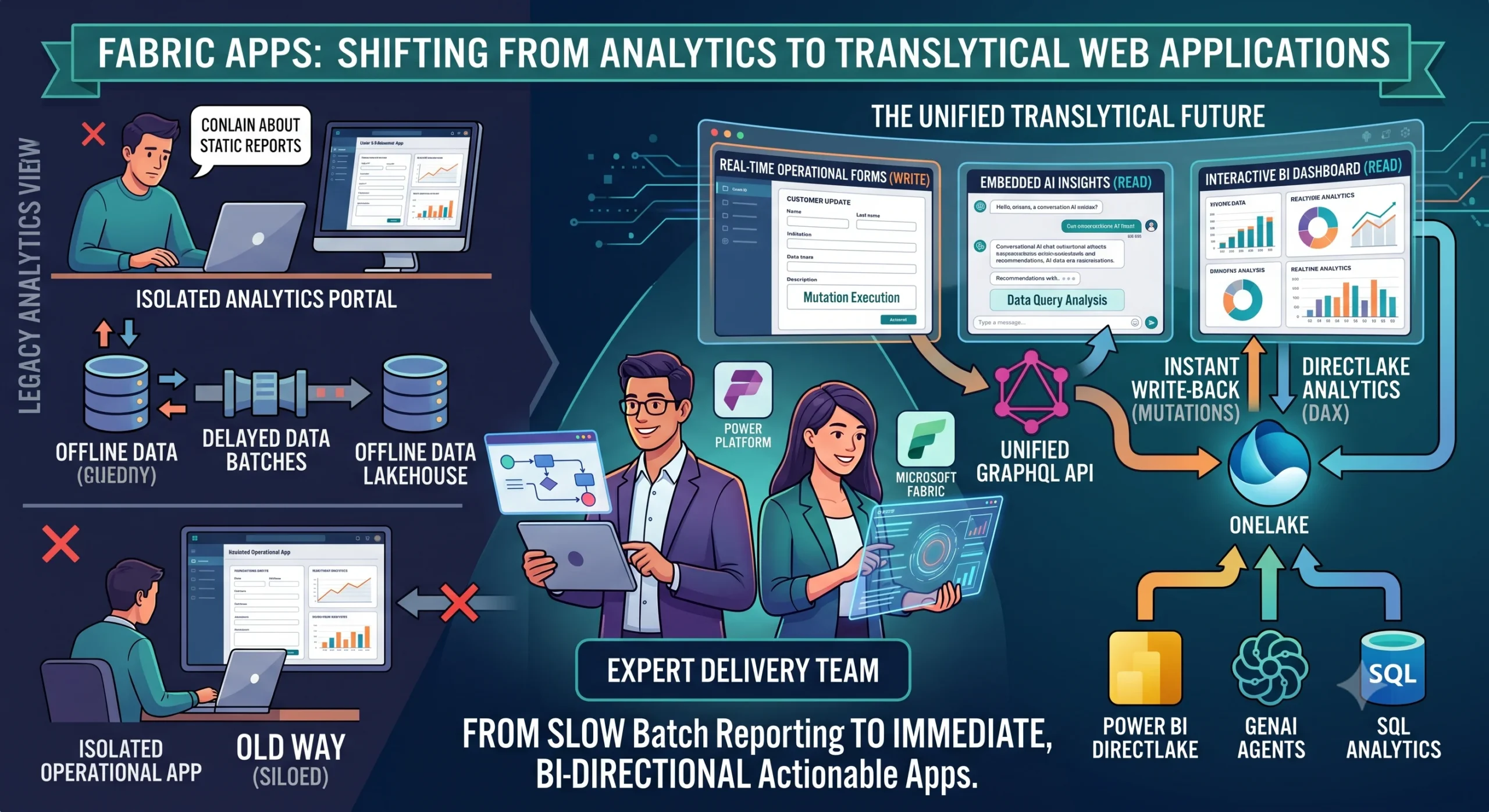
For decades, enterprise architecture has suffered under a strict, frustrating separation of church and state: operational systems handle live transactions, while analytical warehouses process historic records. This divide creates a massive engineering burden. Data engineers spend half their lives building complex Extract-Transform-Load (ETL) or Extract-Load-Transform (ELT) pipelines to shuffle data from transaction databases to data lakes. Meanwhile, application developers build completely separate middle-tier API layers just to give frontend applications a way to fetch or update records.
When corporate leaders demand “real-time insights inside our line-of-business applications,” the traditional answer is a nightmare of token handshakes, embedded iframe frameworks, and heavy synchronization scripts.
But a profound shift is happening. The arrival of Fabric Apps—introduced as a managed, code-first backend-as-a-service environment inside the Microsoft Fabric ecosystem—officially shatters this barrier. We are moving rapidly away from pure, isolated big-data analytics and stepping directly into the era of translytical web applications: singular, unified platforms where massive data lakes and transactional application backends run natively on a single managed footprint.
What is a Translytical Web Application?
Before diving into the mechanics of how Microsoft has executed this shift, it is essential to understand why “translytical” is more than just marketing jargon.
Definition: A translytical (transactional + analytical) architecture is an environment capable of executing high-concurrency transactional queries (such as CRUD operations, form submissions, and record updates) while simultaneously serving heavy, real-time analytical models over the exact same data tier, without resource contention or data duplication.
Historically, doing this on a single database crashed production. If a user ran a heavy year-over-year sales report on the same SQL server processing live e-commerce checkouts, the database locked up. To solve this, we duplicated data into a data warehouse. But data duplication introduces latency, synchronization bugs, and ballooning cloud infrastructure costs.
Fabric Apps completely bypasses this architectural trade-off. By pairing a managed SQL database backend with direct Delta Parquet projection into OneLake, a single workspace item now allows developers to capture operational user actions and feed them directly into enterprise analytics in near real time.
Dismantling the Traditional Stack with Fabric Apps
To appreciate the simplicity that Fabric Apps introduces, consider what a standard data-driven web app required prior to this evolution:
-
The Database Tier: An Azure SQL or PostgreSQL instance to handle app state.
-
The Data Pipeline: An Azure Data Factory or Synapse pipeline to sync that app state down to a Delta lakehouse every hour.
-
The API Tier: A hosted API layer (such as Azure Functions or Web Apps) running custom C# or Node.js logic to act as a middleman.
-
The Auth Layer: Custom Microsoft Entra ID app registrations, client secrets, and token cache management to handle user identities.
-
The Frontend Hosting: A static web hosting service (like Azure Static Web Apps) to deliver the user interface.
If a team wanted to embed Power BI metrics inside that app, a Power Platform Consultant or full-stack engineer had to manage complex Power BI Embedded capacities, master-user credentials, or service principals just to handle the authentication token refresh lifecycle.
Fabric Apps sweeps this entire structural scaffolding away. When you create a Fabric Apps item within a Fabric workspace, Microsoft provisions a fully managed, code-first execution sandbox that includes:
-
A Managed Fabric SQL Database: Serving as the fast transactional storage for your application.
-
Auto-Generated GraphQL APIs: Built on Microsoft’s Data API Builder, translating data models directly into secure endpoints.
-
Built-in Fabric SSO: Native Entra ID authentication that routes user sessions automatically without custom token configuration.
-
Static Frontend Hosting: Serving compiled React, Vue, or vanilla JavaScript assets straight out of OneLake storage.
The entire multi-tier infrastructure is abstracted into a single, governed workspace asset.
Under the Hood: Rayfin SDK, TypeScript, and Data Modeling
Fabric Apps is fundamentally a code-first, developer-centric workload driven by the open-source Rayfin SDK and its accompanying command-line interface (CLI). Rather than configuring databases via visual UI designers or SQL migration scripts, engineers define their entire application structure—both data models and access rules—using standard TypeScript decorators.
Code-First Architecture: From Decorator to GraphQL
When an application engineer scaffolds a project using the Rayfin CLI, they define business entities directly in code. By using specific decorators, the Rayfin engine automatically determines how to build the backend infrastructure.
-
@entity()tells the system to provision a corresponding, highly optimized table within the managed Fabric SQL database. -
@text(),@uuid(), and@integer()establish strict, database-level data types and validation constraints. -
@role()and authorization decorators inject row-level security (RLS) policies directly into the generated API layer.
Once these TypeScript models are defined, running a single terminal command—rayfin up—triggers the Rayfin CLI to analyze the codebase and automatically generate a high-performance Fabric API for GraphQL.
[ TypeScript Data Models ]
           │
           ▼ (rayfin up)
┌─────────────────────────────────────────┐
│          Fabric Apps Managed Pod         │
│  ┌───────────────────────────────────┐  │
│  │     Auto-Gen GraphQL Endpoint     │  │
│  └─────────────────┬─────────────────┘  │
│                    ▼                    │
│  ┌───────────────────────────────────┐  │
│  │      Managed Fabric SQL DB        │  │
│  └─────────────────┬─────────────────┘  │
└────────────────────┼────────────────────┘
                     ▼ (Auto-Mirroring)
         [ OneLake Delta Parquet ]
Because the backend handles database schemas and API routing automatically, developers are entirely freed from writing boilerplate controller logic or managing database migration history files.
Navigating the Two Flavors of Fabric Apps
As organizations adopt this new app-layer framework, it is vital to distinguish between the two core templates provided within the workload. Choosing the right starting point depends entirely on whether your application is built to collect new data or purely to visualize massive scale records.
| Architectural Feature | The Operational App (Default) | The Analytical App (Data App) |
| Primary Workload | Write-heavy transactional processing, CRUD workflows, operational inputs. | Read-heavy interactive experiences, custom analytics, visualization-as-code. |
| Storage Engine | Provisions a managed Fabric SQL Database. | Connects directly to a published Power BI Semantic Model. |
| Query Mechanism | Read/Write via auto-generated GraphQL queries and mutations. | Read-only via direct DAX queries compiled through a .dax file mapping. |
| Data Flow | Writes to SQL -> Auto-mirrors as Delta Parquet into OneLake. | Streams data directly from OneLake via DirectLake mode. |
| UI Rendering | Custom UI or React components interacting with GraphQL data blocks. | Bespoke rendering using Vega-Lite, Vega, or D3.js specs bound to DAX results. |
The Operational App: Real-Time Write-Back loops
The default operational app is where the true translytical magic happens. A common roadblock in enterprise analytics is the “write-back problem.” For example, a supply chain manager looks at an inventory dashboard, spots a massive deficit predicted by a machine learning model, and needs to manually override a replenishment order or log an exception note.
In the old world, that manager had to leave the dashboard, log into a separate ERP system or an isolated custom web app, make the change, and wait for the nightly ETL batch to run before the dashboard reflected the update.
With an operational Fabric App, that exception-handling interface is built directly on top of the analytical layer. The user modifies the order inside the browser interface. The app triggers a GraphQL mutation that writes to the managed SQL database. Because Fabric SQL databases automatically mirror their state into OneLake as Delta Parquet files within seconds, that manual adjustment is instantly sucked into the lakehouse. Downstream reports and semantic models refresh immediately, creating a continuous operational decision loop.
The Analytical App: Visualization-as-Code
For data science and analytics teams, the “Data App” template offers unparalleled visual freedom. While Power BI reports are highly mature and incredibly fast to build, they bind developers to a fixed visual canvas and a pre-defined set of native charts.
An analytical Fabric App replaces the standard canvas with visualization-as-code. Instead of dragging and dropping fields, developers create visual components by co-locating three tight assets:
-
A localized
.daxfile that contains the raw query with dynamic runtime parameters (e.g.,{{SELECTED_YEAR}}). -
A
.jsonspecification file defining a complex, highly customized visual grammar via libraries like Vega-Lite or D3.js. -
A
.tsxReact wrapper that wires the live data stream directly into the browser DOM.
When a user interacts with the app, it triggers the Semantic Model Execute Queries REST API under the hood. This means any Row-Level Security (RLS) or Object-Level Security (OLS) already built into your central enterprise semantic model is strictly enforced at runtime.
The Power of Combined Expertise: Where the Magic Happens
Successfully deploying a translytical web application requires bridging two technical worlds that have historically spoken completely different languages. It demands a flawless alignment between rapid business-process application design and deep, optimized big-data data warehousing. To pull this off, modern teams lean heavily on the complementary skills of two distinct experts.
The Power Platform Consultant: Driving Business Logic and UX Strategy
An experienced Power Platform Consultant is uniquely skilled at analyzing corporate operational bottlenecks. They spend their days understanding how data flows across business units, designing relational data schemas inside Microsoft Dataverse, and constructing tailored user journeys.
When a translytical project kicks off, the Power Platform serves as the vital bridge for user experience and governance. They ensure that the fields, relationships, and operational rules built into the Fabric App align perfectly with the broader corporate ecosystem. Furthermore, they can leverage Dataverse virtual tables to link core transactional environments directly to OneLake, ensuring that the new web applications inherit established security boundaries and business processes without starting from scratch.
The Microsoft Fabric Expert: Optimizing the Engine at Scale
On the other side of the coin, a Microsoft Fabric Expert focuses entirely on the data engine’s performance, optimization, and lifecycle architecture. While an application might run beautifully in local testing with a few hundred records, things change drastically when that app scales to process millions of rows of analytical data.
The Microsoft Fabric manages the heavy technical heavy-lifting required to keep the system responsive:
-
Storage Optimization: Structuring the underlying Delta Parquet files, managing V-Order sorting algorithms, and supervising OneLake item sizes to ensure blisteringly fast read times.
-
Semantic Modeling: Tuning the DirectLake connections and managing DAX query efficiency to guarantee that analytical charts load instantaneously inside custom web interfaces.
-
Network Security: Implementing advanced enterprise guardrails, such as Tenant-Level Private Links, to ensure that the auto-generated GraphQL APIs transmit data across private, isolated Microsoft backbone networks rather than traversing the public internet.
When these two disciplines merge, organizations escape the trap of building slow, disjointed prototypes. Instead, they deploy highly scalable, beautifully tailored applications that can process thousands of real-time entries while displaying multi-terabyte data charts on the exact same screen.
Enterprise Use Cases Primed for Fabric Apps
Where should your organization deploy this new architecture first? Look for operational workflows that are currently held together by spreadsheets, manual copy-pasting, or disconnected legacy portals.
1. Corporate Budgeting, Planning, and Forecasting
Budgeting is an inherently translytical problem. Finance teams need to look at millions of rows of historical spending data (analytical) while simultaneously typing in new, forward-looking projection numbers for the upcoming quarter (transactional).
Instead of routing massive Excel sheets via email, a custom Fabric App allows department heads to log into a single, secure URL. They view historical charts rendered directly from the lakehouse and type their new forecasts directly into a secure grid. The inputs hit the managed SQL backend, mirror to OneLake, and aggregate immediately into corporate cash-flow projections.
2. Master Data Management (MDM) and Record Enrichment
Data lakes frequently suffer from dirty data—missing customer phone numbers, misspelled vendor names, or unmapped product categories. Data engineers can flags these errors using automated data pipelines, but fixing them usually requires human intervention.
An operational Fabric App provides a clean data stewardship portal. Data stewards can view a list of flagged anomalies, review the surrounding context, and input corrections directly through the app interface. The corrected entries are written back to the SQL layer and immediately update the gold layer of the medallion architecture, cleansing the data stream at its source.
3. AI Agent and LLM State Persistence
As generative AI shifts from simple prompt-and-response text boxes to autonomous data agents, these agents need a place to remember past actions. They require a lightweight, transactional state database to store conversational history, operational parameters, and context files.
Fabric Apps provides an ideal hosting environment for advanced AI applications. The app’s frontend serves as the user-facing chat or agent dashboard, the managed SQL backend tracks the agent’s memory and transaction history, and the built-in GraphQL API lets the agent query massive enterprise datasets securely inside the tenant’s existing security boundary.
Embracing the Translytical Future
The launch of Fabric Apps represents a foundational maturity point for cloud architecture. It marks the precise moment where Microsoft Fabric transitioned from being an excellent analytics platform to becoming a comprehensive, enterprise-grade application platform.
By eliminating the need to provision, stitch together, and secure isolated databases, API layers, and authentication protocols, Fabric Apps empowers teams to go from a conceptual wireframe to a live, secure, data-rich URL in a fraction of the time.
As you plan your next data or application initiative, challenge the old assumption that your web apps and your data warehouses must live apart. By combining the business-process insights of a skilled Power Platform Consultant with the performance-tuning mastery of a Microsoft Fabric Expert, your organization can break down the final wall between operations and analytics—delivering bold, unified, and highly responsive software built for a real-time world.





Post Comment