How Does a Paper Shredder Work? A Complete Guide
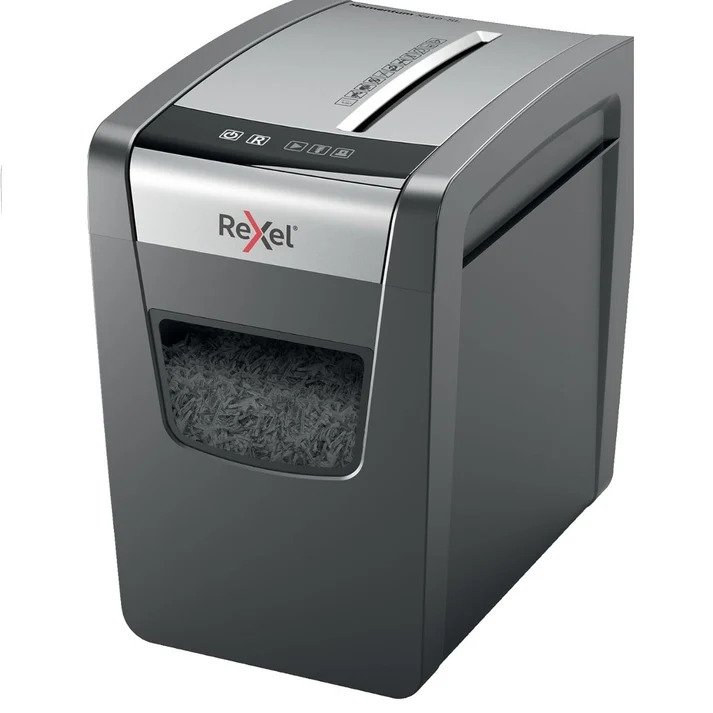
A shredder is a document-destruction machine designed to cut paper into smaller pieces or particles. While using one is as simple as inserting a document into the feed slot, the mechanism inside the machine involves several components working together.
From the motor and cutting blades to safety sensors, automatic reverse functions, and waste bins, each component has a specific purpose.
Understanding how a paper shredder works can help you choose the right machine, use it correctly, and avoid common problems such as paper jams and overheating.
Whether you need a shredder for occasional home use or regular office document disposal, knowing how the machine operates makes it easier to compare different models.
What Is a Paper Shredder?
A paper shredder is an electrical machine that destroys paper documents by cutting them into smaller pieces.
The primary purpose is to make printed information more difficult to read or reconstruct after disposal.
People commonly use shredders to destroy documents containing:
- Personal information
- Bank statements
- Financial records
- Bills
- Receipts
- Business documents
- Customer information
- Employee records
- Confidential correspondence
- Outdated paperwork
Different shredders produce different particle sizes depending on their cutting technology.
How Does a Paper Shredder Work?
The basic operation of a paper shredder follows a relatively simple process:
- Paper is inserted into the feed opening.
- Sensors detect the paper.
- The motor activates the cutting mechanism.
- Rotating blades pull the paper inward.
- The blades cut the paper into strips or particles.
- The shredded material falls into the collection bin.
- The machine stops when the document has passed through.
More advanced machines can include additional functions such as automatic feeding, overload protection, jam detection, automatic reverse, and full-bin indicators.
The Main Components of a Shredder
Although designs vary between manufacturers and models, most shredders contain several essential components.
1. Electric Motor
The motor provides the power required to rotate the cutting mechanism.
When the shredder detects paper, the motor drives the blades and rollers.
Motor strength can influence:
- Sheet capacity
- Shredding speed
- Operating time
- Ability to process thicker paper
- Overall machine performance
A machine designed for high-volume office use generally requires a different level of performance from a compact home shredder.
2. Cutting Blades
The blades are responsible for physically cutting the document.
Their arrangement determines the type of shredding produced.
Common cutting systems include:
- Strip-cut
- Cross-cut
- Micro-cut
Strip-Cut Blades
Strip-cut blades slice the document into long strips.
This is a relatively simple cutting method and can be suitable for documents that do not require a high level of security.
Cross-Cut Blades
Cross-cut systems cut paper in multiple directions.
This creates smaller particles than strip-cut shredding and generally makes reconstruction more difficult.
Micro-Cut Blades
Micro-cut systems produce very small particles.
They are commonly selected when a higher level of document destruction is required.
3. Feed Rollers
Feed rollers help pull paper into the cutting mechanism.
When a document enters the feed opening, rollers grip the paper and move it toward the blades.
The quality and design of the feeding system can affect:
- Paper handling
- Feed reliability
- Jam frequency
- Maximum sheet capacity
Automatic-feed machines use additional mechanisms to process stacks of paper without requiring every sheet to be manually inserted.
4. Paper Sensors
Many modern shredders use sensors to detect when paper enters the feed opening.
When the sensor detects paper, it can activate the motor automatically.
This allows the user to insert a document without manually switching the machine on and off for every page.
Some models may also use sensors for:
- Jam detection
- Bin-full detection
- Overload protection
- Safety shutoff
The exact functions depend on the machine.
5. Waste Bin
After paper passes through the cutting mechanism, the shredded particles fall into a collection bin.
The size of the bin is important because it determines how frequently you need to empty the machine.
A small home model may have a relatively compact waste bin.
A larger office paper shredder may have a larger collection capacity designed for heavier workloads.
Some machines also include indicators that tell the user when the bin needs to be emptied.
6. Control Panel
Basic shredders may have only a few controls.
Common settings include:
- Auto
- Off
- Reverse
More advanced machines may provide additional controls or indicators for:
- Overheating
- Overloading
- Bin full
- Door open
- Jam
- Automatic operation
The exact interface varies between models.
How Does the Shredding Process Begin?
When paper is inserted into the machine, a sensor can detect it.
The machine then activates the motor.
The motor rotates the cutting mechanism, while feed rollers move the paper toward the blades.
The blades grip and cut the document.
Once the paper has passed completely through the cutting mechanism, the machine can automatically stop.
This process happens quickly, which is why shredding a document can take only a few seconds.
How Does a Cross-Cut Shredder Work?
A cross-cut machine uses cutting mechanisms that work in more than one direction.
Instead of creating only long strips, the paper is cut into smaller particles.
This provides a higher level of destruction compared with traditional strip-cut shredding.
Cross-cut shredders are commonly used for:
- Personal documents
- Financial paperwork
- Business records
- Customer information
- Confidential office documents
The exact particle size depends on the model.
How Does a Micro-Cut Shredder Work?
A micro-cut machine uses a finer cutting mechanism to turn documents into very small particles.
The process is similar to other shredders:
- Paper enters the feed opening.
- Sensors activate the machine.
- Rollers move the paper forward.
- Cutting components process the paper.
- Very small particles fall into the waste bin.
Because the particles are smaller, micro-cut shredders can provide a higher level of document destruction.
However, buyers should also consider speed, capacity, operating cycle, and maintenance.
How Does an Automatic-Feed Shredder Work?
Automatic-feed shredders are designed to process a stack of documents with less manual feeding.
Instead of inserting individual sheets continuously, the user loads a specified quantity into the automatic-feed compartment.
The machine then feeds the documents through the cutting mechanism.
This can be useful when:
- You have large document batches.
- You regularly shred paperwork.
- You want to reduce manual feeding.
- You need greater productivity.
Toyzinn’s current collection includes Rexel Optimum AutoFeed+ models with automatic-feed capacities ranging from 150 to 750 sheets under specified conditions.
The actual capacity depends on the individual model and manufacturer’s instructions.
What Happens During a Paper Jam?
A paper jam occurs when paper becomes stuck inside the feed or cutting mechanism.
This can happen for several reasons.
Common causes include:
- Inserting too many sheets
- Using paper that is too thick
- Feeding folded documents
- Incorrect paper placement
- Overloading the machine
- Foreign objects entering the feed opening
Many shredders include a reverse function.
When activated, the cutting mechanism rotates in the opposite direction to help release the paper.
How Does the Reverse Function Work?
The reverse function changes the direction of the cutting mechanism.
Instead of pulling paper further into the machine, the blades move backward.
This can help release partially shredded documents.
If a jam does not clear using the manufacturer’s recommended reverse procedure, turn the machine off and follow the specific instructions in the user manual.
Never put your hands inside the cutting mechanism.
What Causes a Shredder to Overheat?
Shredders generate heat during operation.
If the machine runs continuously for longer than its recommended operating cycle, the motor can become too hot.
To protect itself, the machine may automatically stop.
Overheating can be caused by:
- Long continuous operation
- Processing too much paper
- Repeatedly shredding large batches
- Exceeding the recommended capacity
- Insufficient cooling time
The solution is usually to allow the machine to cool before continuing.
Always follow the manufacturer’s duty-cycle instructions.
What Is a Shredder’s Duty Cycle?
The duty cycle refers to how long a shredder can operate before it needs a cooling period.
For example, a manufacturer may specify a certain continuous operating period followed by a required rest period.
Duty cycle matters particularly for offices.
If you regularly destroy large amounts of paper, choose a machine designed for your expected workload.
A compact home machine may not be suitable for continuous commercial use.
How Does Overload Protection Work?
Some shredders can detect when too much paper is being inserted.
If the machine detects an overload, it may:
- Stop the motor
- Display a warning
- Reverse the cutting mechanism
- Prevent further feeding
This helps reduce stress on the motor and cutting system.
However, overload protection should not be treated as permission to exceed the manufacturer’s sheet capacity.
How Does a Shredder Know When Paper Is Present?
Many machines use sensors near the paper-entry area.
When paper interrupts the sensor, the machine detects that material is ready to be shredded.
Depending on the design, the sensor may trigger:
- Motor activation
- Feed rollers
- Cutting blades
When the paper leaves the sensing area, the machine can stop automatically.
This is why many modern shredders operate simply by inserting a document.
How Does a Shredder Protect the User?
Safety mechanisms vary between models.
Potential features include:
- Automatic shutoff
- Safety switches
- Overload protection
- Overheating protection
- Jam detection
- Door-open sensors
These features are designed to reduce operational risks.
Users should still follow the manufacturer’s safety instructions.
Keep hands, clothing, hair, and other objects away from the feed opening.
What Can a Paper Shredder Destroy?
A machine should only be used for materials specifically approved by the manufacturer.
Depending on the model, a shredder may be able to process:
- Paper
- Documents containing staples
- Small paper clips
- Credit cards
- CDs or DVDs
Not every machine supports these materials.
Always check the product specifications before inserting anything other than standard paper.
Why Does a Shredder Sometimes Make Different Sounds?
A shredder’s sound can change depending on what it is processing.
For example:
- Thin paper may produce a lighter sound.
- A thicker stack may create more motor noise.
- Staples can produce additional noise.
- A jam can create an unusual mechanical sound.
If the machine suddenly produces grinding, clicking, or abnormal sounds, stop operation and inspect it according to the manufacturer’s troubleshooting instructions.
Why Does Paper Sometimes Come Out Partially Shredded?
Partially shredded paper can result from:
- A jam
- Insufficient feeding
- Overloading
- Damaged cutting components
- Foreign objects
- Mechanical problems
Do not continue forcing paper through the machine.
Stop the machine and follow the recommended troubleshooting process.
How Does a Shredder Handle Different Paper Thicknesses?
Paper thickness affects the load placed on the motor and cutting mechanism.
A machine may be rated for a particular number of standard sheets, but thicker paper can reduce the actual number of sheets that can be processed at once.
Examples include:
- Standard printer paper
- Cardstock
- Glossy paper
- Folded documents
- Envelopes
Always check the manufacturer’s specifications before processing unusual paper types.
Why Is Shredder Maintenance Important?
Regular maintenance can help preserve performance and reduce avoidable problems.
Depending on the model, maintenance may involve:
- Emptying the waste bin
- Cleaning paper dust
- Lubricating the cutting mechanism
- Checking the feed opening
- Removing paper debris
- Following recommended service procedures
Different cutting technologies can have different maintenance requirements.
Always follow the manufacturer’s instructions.
How Often Should a Shredder Be Lubricated?
There is no universal schedule for every machine.
Lubrication requirements depend on:
- Model
- Cutting mechanism
- Frequency of use
- Paper volume
- Manufacturer recommendations
Some manufacturers recommend specific shredder oil or lubrication procedures.
Use only products and methods recommended for your particular machine.
Does a Paper Shredder Use a Lot of Electricity?
Electricity consumption depends on the motor, operating time, and model.
A machine that runs for a few minutes at a time generally uses less electricity than one operating continuously throughout the day.
Automatic-feed models can also have different power requirements from compact manual-feed machines.
If energy consumption matters to you, check the manufacturer’s electrical specifications.
What Makes a Good Shredder Machine?
A good shredder machine should match your actual workload and security requirements.
Important factors include:
- Cutting type
- Security level
- Sheet capacity
- Shredding speed
- Bin size
- Duty cycle
- Automatic feeding
- Jam protection
- Noise
- Maintenance
- Warranty
The best machine is not necessarily the most expensive one.
It is the model that can reliably handle your documents without being unnecessarily oversized for your needs.
How to Use a Shredder Correctly
Follow these basic steps:
Step 1: Prepare the Documents
Remove materials that the manufacturer does not allow.
Step 2: Check the Sheet Capacity
Do not exceed the recommended number of sheets.
Step 3: Insert the Paper
Place the documents into the correct feed opening.
Step 4: Allow the Machine to Work
Do not push paper forcefully into the machine.
Step 5: Monitor the Bin
Empty it when necessary.
Step 6: Observe the Duty Cycle
Allow the machine to cool when required.
Step 7: Perform Maintenance
Follow the manufacturer’s maintenance recommendations.
Common Shredder Problems
Paper Jams
Usually caused by excessive paper or incorrect feeding.
Overheating
Often related to excessive continuous operation.
Machine Won’t Start
Possible causes include an open door, full bin, power issue, or safety sensor activation.
Slow Shredding
May result from excessive paper, maintenance issues, or machine limitations.
Unusual Noise
Could indicate a jam, foreign object, or mechanical problem.
If basic troubleshooting does not resolve the problem, consult the manufacturer’s instructions or qualified service support.
How to Choose a Shredder Based on How It Works
Understanding the internal mechanism can help you compare models.
For Occasional Home Use
Focus on:
- Compact size
- Suitable security
- Simple operation
- Moderate capacity
For Home Offices
Consider:
- Cross-cut security
- Larger bin
- Better operating cycle
- Reasonable sheet capacity
For Small Offices
Look for:
- Higher capacity
- Larger bin
- Reliable feeding
- Suitable security
- Jam protection
For High-Volume Offices
Consider:
- Automatic feeding
- Higher throughput
- Longer duty cycle
- Larger waste capacity
- Higher security
Final Thoughts
A paper shredder may look like a simple office machine, but several components work together to destroy documents efficiently.
The motor powers the cutting mechanism, feed rollers move documents into the blades, sensors detect paper, and the waste bin collects the resulting particles. More advanced models can also include automatic feeding, overload protection, jam detection, and overheating protection.
The cutting mechanism determines whether the machine produces strips, cross-cut particles, or micro-cut particles, which directly affects the level of document destruction.
When choosing a paper shredder machine, consider how much paper you need to process, what type of information you handle, how frequently the machine will operate, and what level of security you require.
Understanding how the machine works also helps you use it correctly and avoid common problems such as overloading, overheating, and paper jams.
For shoppers exploring other products alongside office equipment, including toys near me, Toyzinn offers products across a variety of categories.
Frequently Asked Questions
1. How does a paper shredder work?
A paper shredder uses a motor to power cutting blades that pull and cut paper into smaller pieces. Sensors can detect paper and activate the machine automatically.
2. What is inside a paper shredder?
A typical shredder contains a motor, cutting blades, feed rollers, sensors, control mechanisms, and a waste collection bin. Advanced models can include additional safety and automation components.
3. How does a cross-cut shredder work?
A cross-cut shredder cuts paper in multiple directions, creating smaller particles than a strip-cut machine. This generally makes document reconstruction more difficult.
4. How does a micro-cut shredder work?
A micro-cut shredder uses a finer cutting mechanism to turn documents into very small particles. It is commonly selected when a higher level of document destruction is required.
5. Why does a shredder get hot?
The motor generates heat during operation. Extended use beyond the manufacturer’s recommended duty cycle can cause the machine to overheat and activate its thermal protection.
6. How do you fix a paper shredder jam?
If the model has a reverse function, use it according to the manufacturer’s instructions. If the jam remains, turn the machine off and follow the manufacturer’s specific clearing procedure.
7. Why does my shredder stop working?
Possible reasons include overheating, an overloaded feed, a full waste bin, an open door, a jam, or a safety sensor being activated. Check the manufacturer’s troubleshooting instructions.
8. Can a paper shredder shred staples?
Some models can process documents containing staples, but this capability varies. Always check the individual machine’s specifications before shredding stapled documents.





Post Comment